> ## Documentation Index
> Fetch the complete documentation index at: https://docs.zerorank.ai/llms.txt
> Use this file to discover all available pages before exploring further.
# Citation tracking
> The websites AI points to when it answers — and whether yours is one of them.
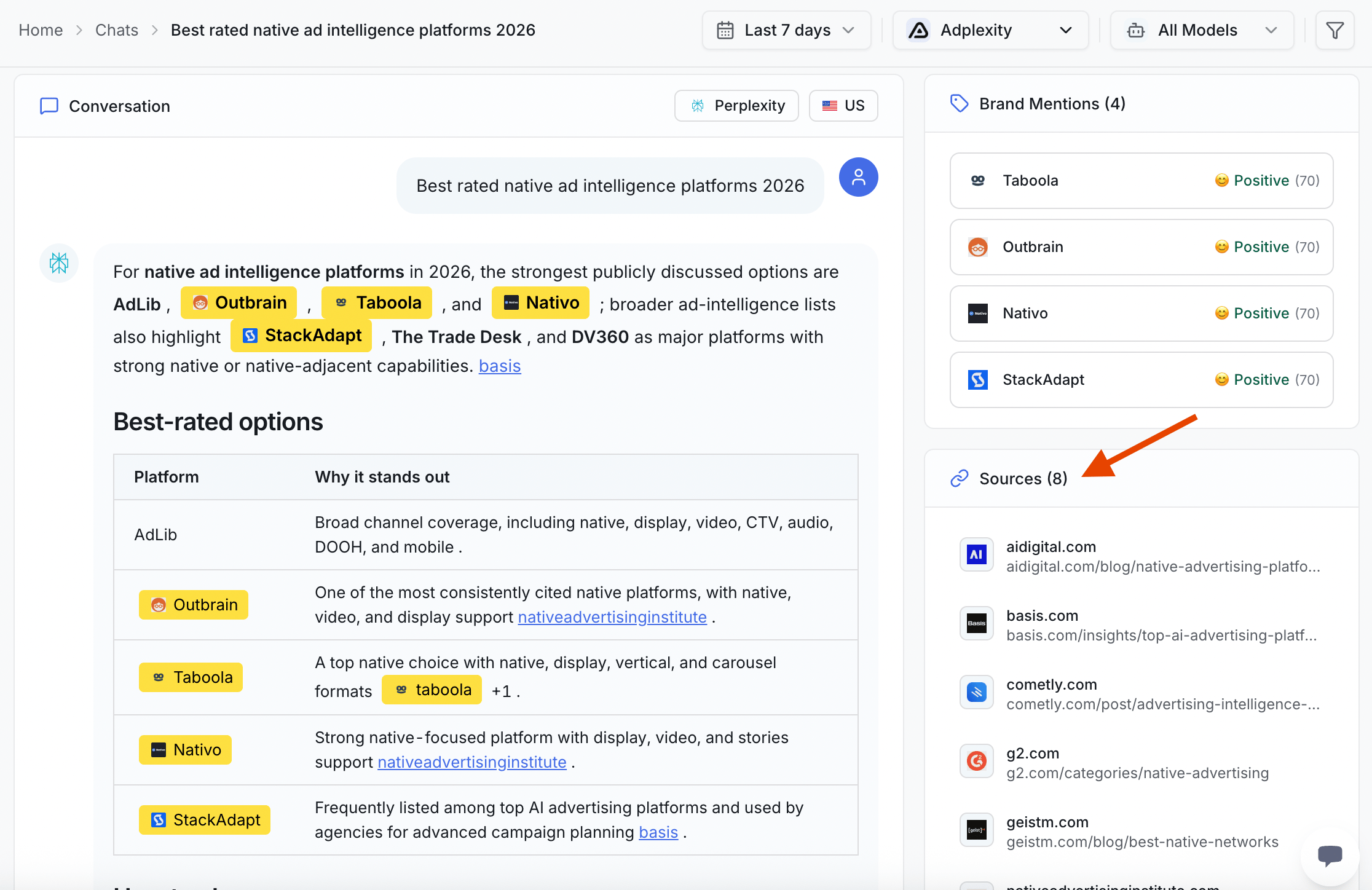
A [citation](/start/glossary) is **a website the AI points to as its source**. When an AI engine answers a question, it often shows links to the pages it used. Those links are citations.
ZeroRank pulls the citations out of every [chat](/start/glossary) (the answer an AI engine gave back) it captures. So for each answer, you can see exactly which websites helped shape it.
 ## Why citations matter
When AI cites a site, it is treating that site as trustworthy. The page passed the AI's bar for a good source.
Being cited is also how you get recommended. AI reads its trusted sources, then writes its answer from them. If your pages are in that trusted pile, AI is far more likely to name you.
Mentions and citations are not the same thing. A mention is AI saying your brand name. A citation is AI linking to your website as a source. You want both.
## Citation share
Citation share is how often your site is cited compared to everyone else. It answers one question: out of all the sources AI pulls from for your topic, how big a slice is yours?
* A bigger slice means AI leans on your pages a lot.
* A smaller slice means rivals' pages are doing more of the work.
ZeroRank stores a citation count and a source count for every chat. Adding those up across all your answers is what lets you see your share and compare it to others.
## Watch the pages you care about
Some pages matter more to you than others. Maybe it is your pricing page, a buying guide, or a comparison post. You want AI to cite those.
Watched pages let you keep an eye on specific pages you want cited. You pick the pages, and ZeroRank tracks whether AI is pointing to them. ZeroRank even uses **Citation Watched Pages** as a step you can drop into a [workflow](/start/glossary), so you can check on them automatically.
If a page you are watching stops getting cited, that is your signal to refresh it.
## Find the pages cited most often
This is task 3 on your [getting-started checklist](/start/getting-started-checklist). Here is how to use it.
The view lists the domains and pages that show up most across your answers.
See which pages AI quotes again and again for your topic. These are the pages shaping how AI talks about your space.
Some will be yours. Many will belong to rivals or to neutral sites like review lists. That tells you who AI trusts right now.
The pages cited most often are a map. They show you the kind of content AI likes to quote for your topic.
## From citations to action
Once you know what gets cited, you can make more of it. The goal is simple: create the kind of pages that get cited.
* Look at the page types that win citations on the [sources](/citations/sources) page.
* Then use [create content](/improve/create-content) to publish pages built the same way, clear and easy for AI to quote.
As your new pages start showing up as citations, AI begins to trust and recommend you more.
## Keep going
Learn which kinds of pages AI quotes from most.
Publish pages built to get cited and quoted.
## Why citations matter
When AI cites a site, it is treating that site as trustworthy. The page passed the AI's bar for a good source.
Being cited is also how you get recommended. AI reads its trusted sources, then writes its answer from them. If your pages are in that trusted pile, AI is far more likely to name you.
Mentions and citations are not the same thing. A mention is AI saying your brand name. A citation is AI linking to your website as a source. You want both.
## Citation share
Citation share is how often your site is cited compared to everyone else. It answers one question: out of all the sources AI pulls from for your topic, how big a slice is yours?
* A bigger slice means AI leans on your pages a lot.
* A smaller slice means rivals' pages are doing more of the work.
ZeroRank stores a citation count and a source count for every chat. Adding those up across all your answers is what lets you see your share and compare it to others.
## Watch the pages you care about
Some pages matter more to you than others. Maybe it is your pricing page, a buying guide, or a comparison post. You want AI to cite those.
Watched pages let you keep an eye on specific pages you want cited. You pick the pages, and ZeroRank tracks whether AI is pointing to them. ZeroRank even uses **Citation Watched Pages** as a step you can drop into a [workflow](/start/glossary), so you can check on them automatically.
If a page you are watching stops getting cited, that is your signal to refresh it.
## Find the pages cited most often
This is task 3 on your [getting-started checklist](/start/getting-started-checklist). Here is how to use it.
The view lists the domains and pages that show up most across your answers.
See which pages AI quotes again and again for your topic. These are the pages shaping how AI talks about your space.
Some will be yours. Many will belong to rivals or to neutral sites like review lists. That tells you who AI trusts right now.
The pages cited most often are a map. They show you the kind of content AI likes to quote for your topic.
## From citations to action
Once you know what gets cited, you can make more of it. The goal is simple: create the kind of pages that get cited.
* Look at the page types that win citations on the [sources](/citations/sources) page.
* Then use [create content](/improve/create-content) to publish pages built the same way, clear and easy for AI to quote.
As your new pages start showing up as citations, AI begins to trust and recommend you more.
## Keep going
Learn which kinds of pages AI quotes from most.
Publish pages built to get cited and quoted.