> ## Documentation Index
> Fetch the complete documentation index at: https://docs.zerorank.ai/llms.txt
> Use this file to discover all available pages before exploring further.
# Your AEO score
> A 0-100 grade for how AI-friendly a piece of content is.
Your AEO score is a grade from 0 to 100 for a piece of content. AEO means [Answer Engine Optimization](/start/glossary) — making your content easy for AI to find and quote.
A higher score means it is easier for AI to find, read, and quote your content. A lower score means AI may skip it or get it wrong.
The score is a guide, not a pass-or-fail test. Use it to spot weak spots, then fix them.
## What goes into the score
ZeroRank looks at 6 signals. Each one gets its own grade from 0 to 100. Then we mix them together. Some signals count more than others, so each has a weight.
| Signal | Weight | What it means in plain words |
| --------------------- | ------ | ------------------------------------------------------------------------- |
| Information density | 30.55% | How much real, on-topic substance you pack into each paragraph. |
| Answerability signals | 22.9% | Does it directly answer questions the way people actually ask them. |
| Content freshness | 16.33% | Is it recent and clearly dated. |
| Machine readability | 11.57% | Can software easily read the structure and the behind-the-scenes details. |
| Readability | 10.2% | Is it easy for a person to scan and understand. |
| Content structure | 8.45% | Does it have a clear title, headings, and subheadings. |
Your overall score is the weighted average of these 6 grades. So the signals with bigger weights move your score the most.
## How to raise each signal
Want a better score? Work on the signals one at a time. Here is one quick tip for each.
Cut filler and fluff. Make every paragraph add a real fact, number, or step that helps the reader.
Ask the question, then answer it right away. Use the same words your readers would type into an AI engine.
Show a clear date and keep facts up to date. Old, undated pages look stale to AI.
Use clean headings, lists, and a page title and description. This helps software read your page.
Write short sentences and short paragraphs. Break big blocks of text into bullets so people can scan.
Give the page one clear title. Add headings and subheadings so each part is easy to find.
Start with the heaviest signals. Improving information density and answerability moves your overall score the most.
## Where you see your score
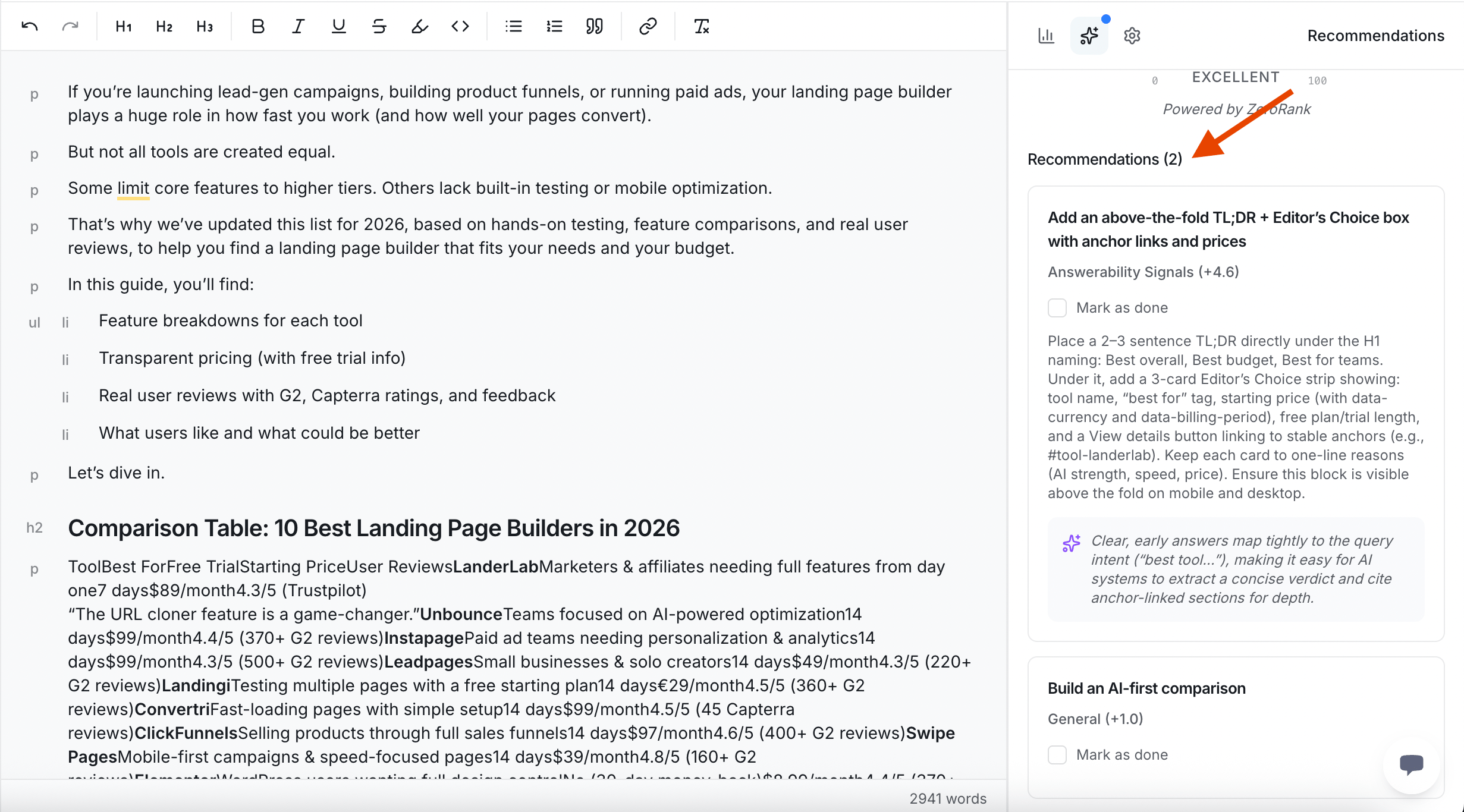
You see the AEO score inside [Create / Optimize](/improve/create-content). When you write a new article or paste in an old page, ZeroRank grades it on all 6 signals and shows you the overall number.
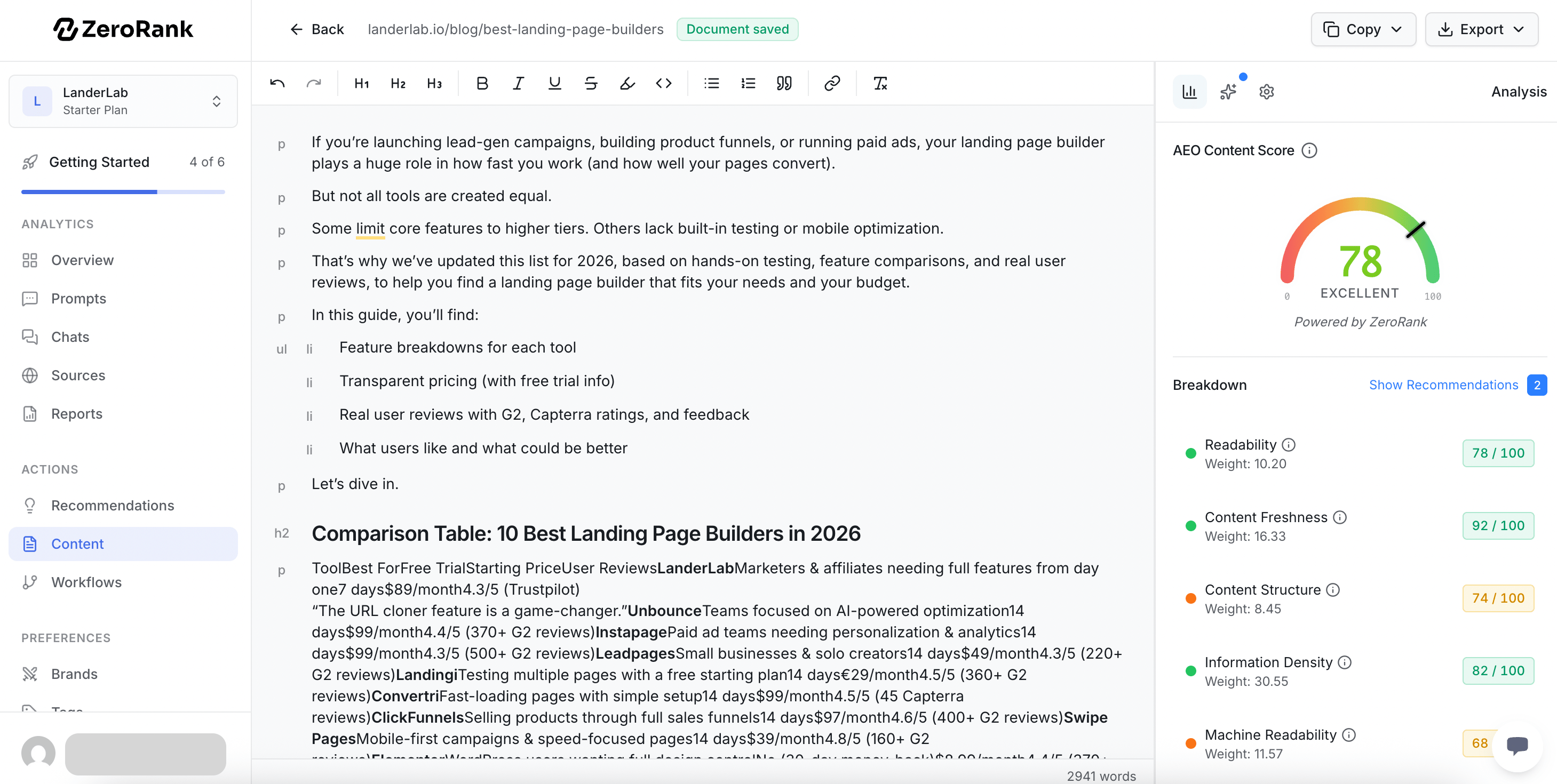 It also lists recommendations for each signal. Make a change, run it again, and watch the score go up.
 ## Keep going
Write or improve a page and grade it on all 6 signals.
Check whether AI engines can reach and read your whole site.
## Keep going
Write or improve a page and grade it on all 6 signals.
Check whether AI engines can reach and read your whole site.