> ## Documentation Index
> Fetch the complete documentation index at: https://docs.zerorank.ai/llms.txt
> Use this file to discover all available pages before exploring further.
# AI readiness checks
> A site checkup that helps AI understand who you are and what you offer.
AI engines read your website before they answer questions about you. ZeroRank checks your site for the things those engines look for. Each check passes or fails, and you get a clear list of what to fix.
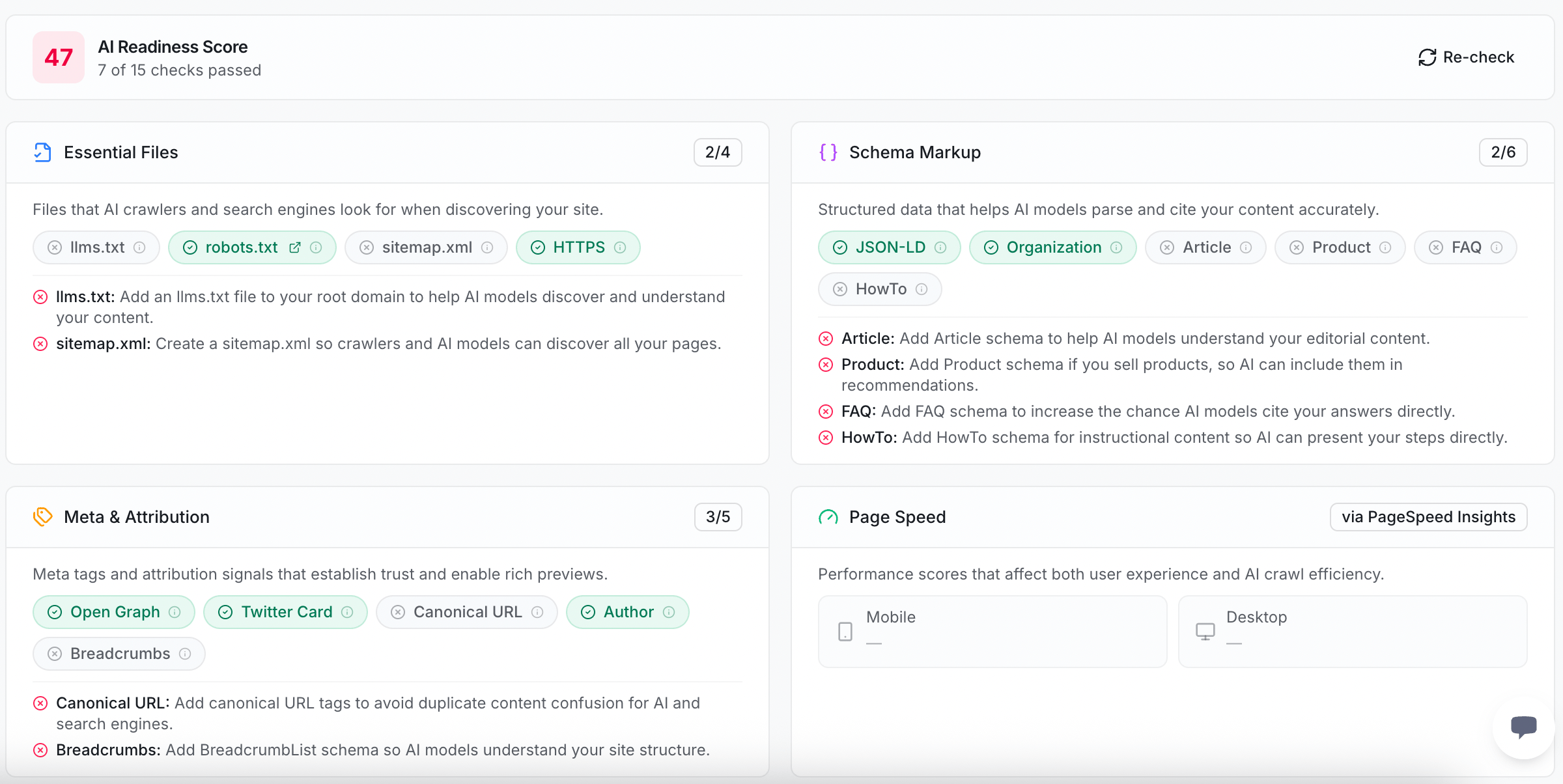 The check is split into four parts. Below is every item, what it is, and why AI likes it.
## What we check
Small files at the root of your site that tell crawlers (the bots that read websites) what to do.
* **`llms.txt`** — a file that introduces your site to AI models, so they understand what you offer.
* **`robots.txt`** — a file that tells crawlers which pages they may visit.
* **`sitemap.xml`** — a map of all your pages, so crawlers can find every one.
* **HTTPS** — a secure connection, which AI engines trust more than a plain one.
Schema markup means small labels in your page code that tell machines what things are. Clear labels help AI quote you correctly.
* **JSON-LD** — the format these labels are written in.
* **Organization** — labels that say who your brand is.
* **Article** — labels that mark a piece of writing, like a blog post.
* **Product** — labels that describe something you sell.
* **FAQ** — labels that mark questions and answers.
* **HowTo** — labels that mark step-by-step instructions.
Extra tags that give AI a tidy preview of your page and show who made it.
* **Open Graph** — tags that build a rich preview when your page is shared.
* **Twitter Card** — tags that build a preview on X (Twitter).
* **Canonical URL** — a tag that points to the one true web address for a page, so AI does not see duplicates.
* **Author** — a label that names who wrote the content, which signals expertise.
* **Breadcrumbs** — labels that show where a page sits in your site, so AI understands your structure.
A score for how fast your pages load, on both phone and desktop. Fast pages get crawled and used more happily, so AI is more likely to reach all of your content.
You do not need every check to pass. Start with the ones marked as failed. Each one comes with a short note on what to add.
## Where to find this in the app
You can run this checkup yourself.
In [the app](https://app.zerorank.ai), go to the technical recommendations area.
The top card shows your **AI Readiness Score** and how many checks passed.
Each failed check comes with a short note on what to add. Hand it to whoever manages your site.
After you make a change, click **Re-check** to run the checkup again.
Not sure what a word like `llms.txt` or schema means? The [glossary](/start/glossary) explains the terms in plain words.
## Next steps
See the full list of fixes ZeroRank suggests for your site.
Check how ready a single page is for AI answers.
The check is split into four parts. Below is every item, what it is, and why AI likes it.
## What we check
Small files at the root of your site that tell crawlers (the bots that read websites) what to do.
* **`llms.txt`** — a file that introduces your site to AI models, so they understand what you offer.
* **`robots.txt`** — a file that tells crawlers which pages they may visit.
* **`sitemap.xml`** — a map of all your pages, so crawlers can find every one.
* **HTTPS** — a secure connection, which AI engines trust more than a plain one.
Schema markup means small labels in your page code that tell machines what things are. Clear labels help AI quote you correctly.
* **JSON-LD** — the format these labels are written in.
* **Organization** — labels that say who your brand is.
* **Article** — labels that mark a piece of writing, like a blog post.
* **Product** — labels that describe something you sell.
* **FAQ** — labels that mark questions and answers.
* **HowTo** — labels that mark step-by-step instructions.
Extra tags that give AI a tidy preview of your page and show who made it.
* **Open Graph** — tags that build a rich preview when your page is shared.
* **Twitter Card** — tags that build a preview on X (Twitter).
* **Canonical URL** — a tag that points to the one true web address for a page, so AI does not see duplicates.
* **Author** — a label that names who wrote the content, which signals expertise.
* **Breadcrumbs** — labels that show where a page sits in your site, so AI understands your structure.
A score for how fast your pages load, on both phone and desktop. Fast pages get crawled and used more happily, so AI is more likely to reach all of your content.
You do not need every check to pass. Start with the ones marked as failed. Each one comes with a short note on what to add.
## Where to find this in the app
You can run this checkup yourself.
In [the app](https://app.zerorank.ai), go to the technical recommendations area.
The top card shows your **AI Readiness Score** and how many checks passed.
Each failed check comes with a short note on what to add. Hand it to whoever manages your site.
After you make a change, click **Re-check** to run the checkup again.
Not sure what a word like `llms.txt` or schema means? The [glossary](/start/glossary) explains the terms in plain words.
## Next steps
See the full list of fixes ZeroRank suggests for your site.
Check how ready a single page is for AI answers.