> ## Documentation Index
> Fetch the complete documentation index at: https://docs.zerorank.ai/llms.txt
> Use this file to discover all available pages before exploring further.
# Ranking
> Where your brand lands next to competitors in AI answers.
When an AI engine answers a question, it often lists several brands at once. Maybe it names five hair clinics, or three running shoes. The order it picks them in matters. Being named first is better than being named last.
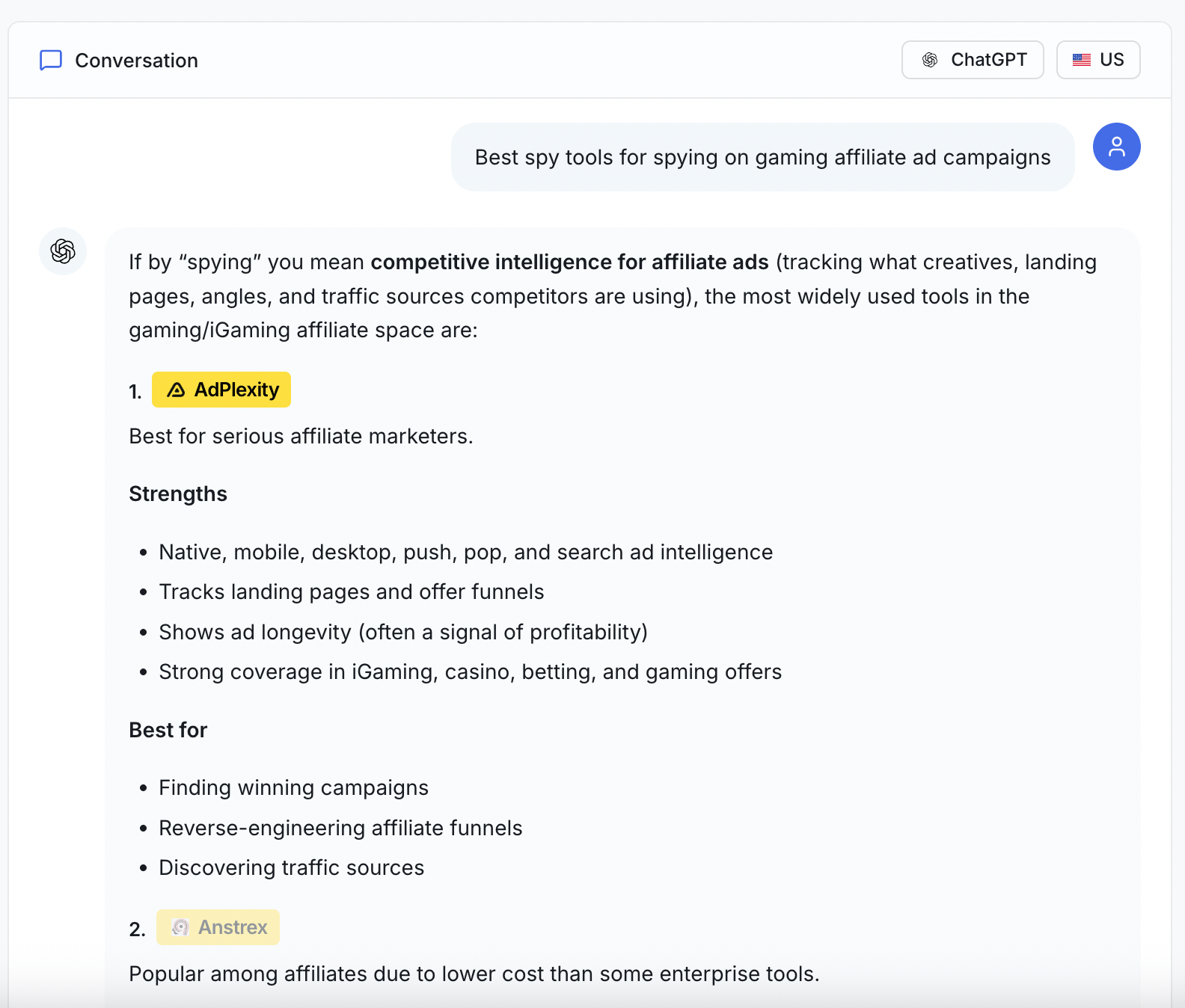 The **Rank** **score** shows where your brand lands in that order, next to your competitors.
A lower number is better. Rank 1 means the AI talked about you before anyone else.
## Three ways we look at the Rank score
ZeroRank calculates Rank at three different levels:
### Overall Rank
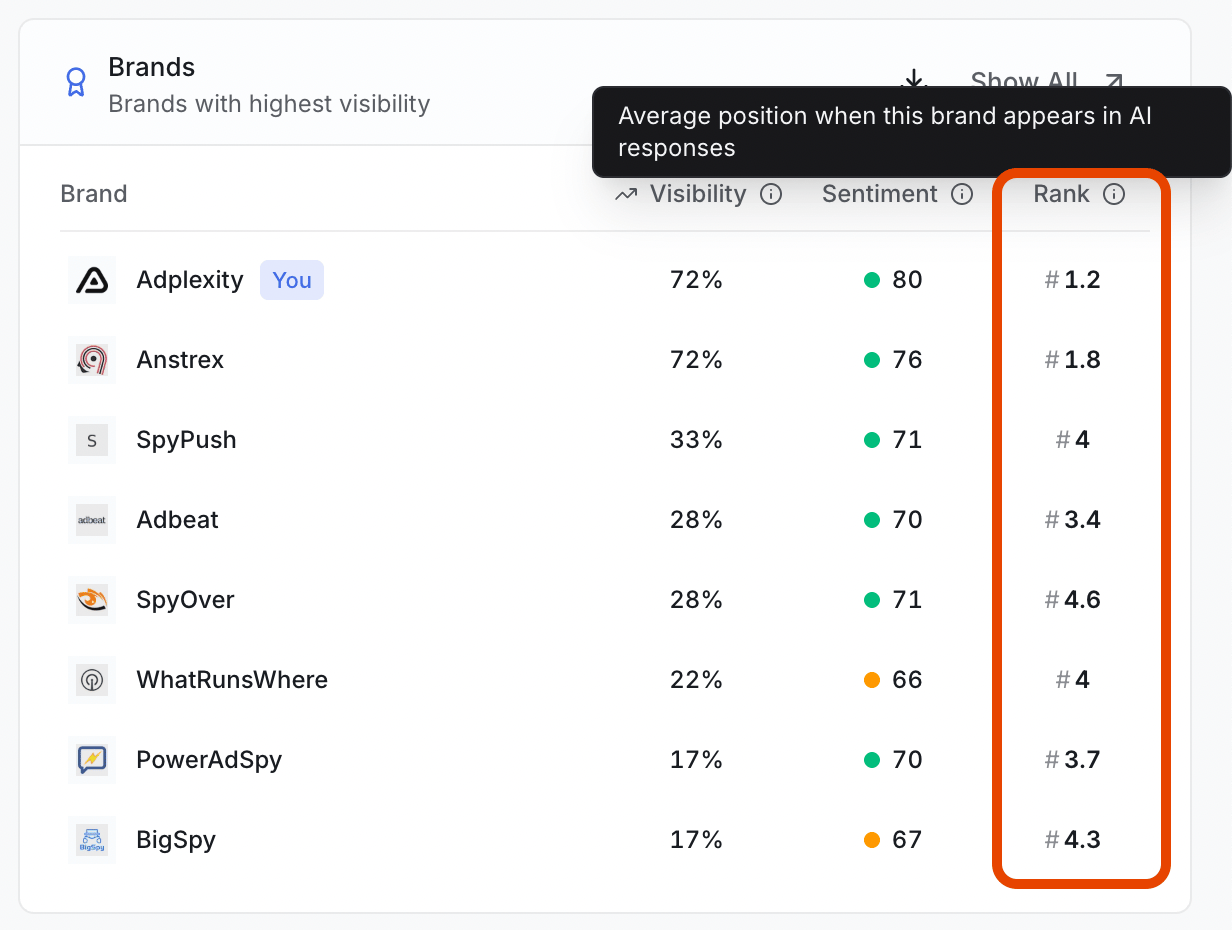
Your overall Rank across all tracked prompts, topics, and AI engines. This gives you a high-level view of how your brand performs compared to competitors.
You can view the overall rank from the **Overview** page.
The **Rank** **score** shows where your brand lands in that order, next to your competitors.
A lower number is better. Rank 1 means the AI talked about you before anyone else.
## Three ways we look at the Rank score
ZeroRank calculates Rank at three different levels:
### Overall Rank
Your overall Rank across all tracked prompts, topics, and AI engines. This gives you a high-level view of how your brand performs compared to competitors.
You can view the overall rank from the **Overview** page.
 ### Topic Rank
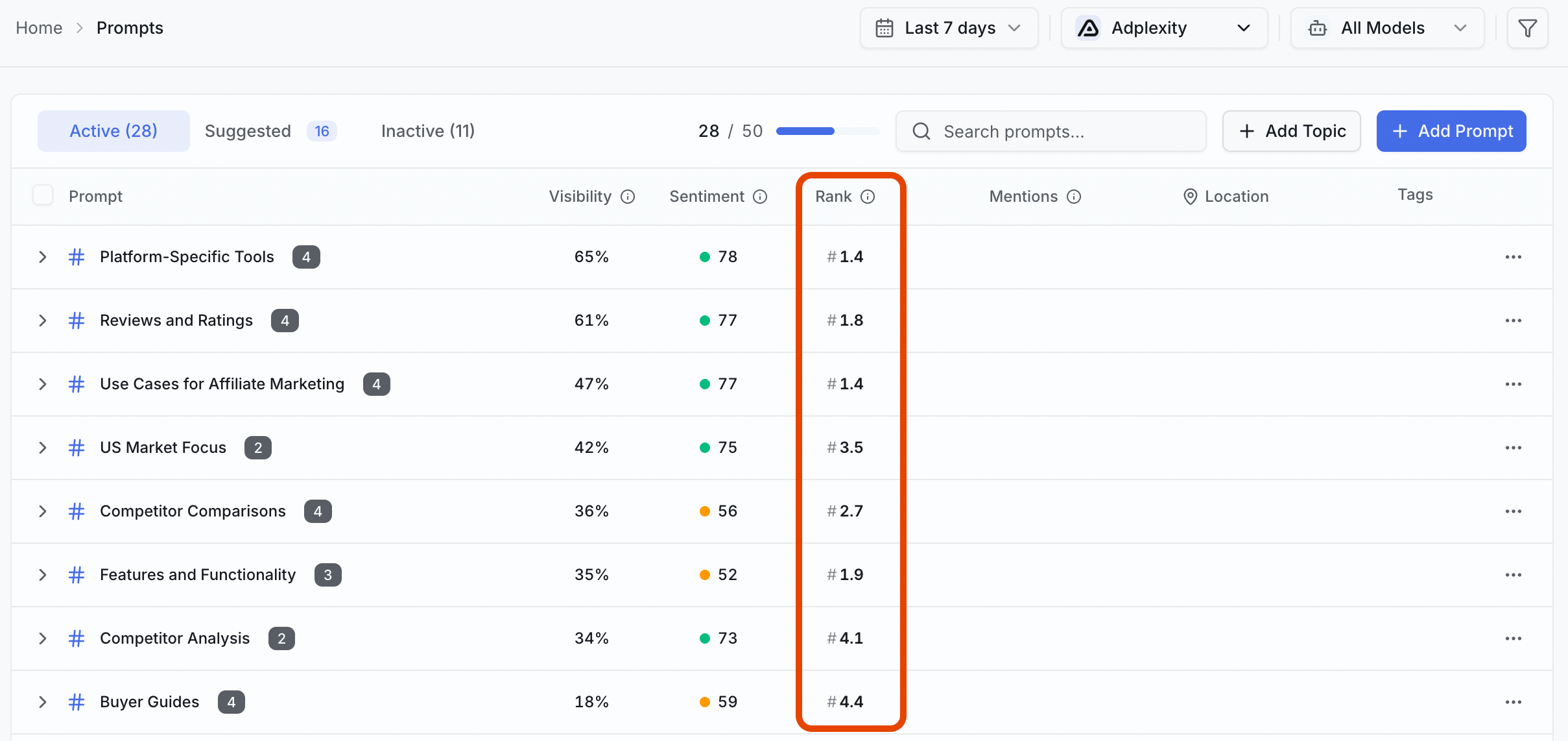
Your Rank within a specific topic, such as CRM software, email marketing, or native advertising. These are the topics your prompts are grouped into.
Topic rankings help you understand where you are strongest and where competitors are outperforming you.
You can view the topic Rank from the **Prompts** page.
### Topic Rank
Your Rank within a specific topic, such as CRM software, email marketing, or native advertising. These are the topics your prompts are grouped into.
Topic rankings help you understand where you are strongest and where competitors are outperforming you.
You can view the topic Rank from the **Prompts** page.
 ### Prompt Rank
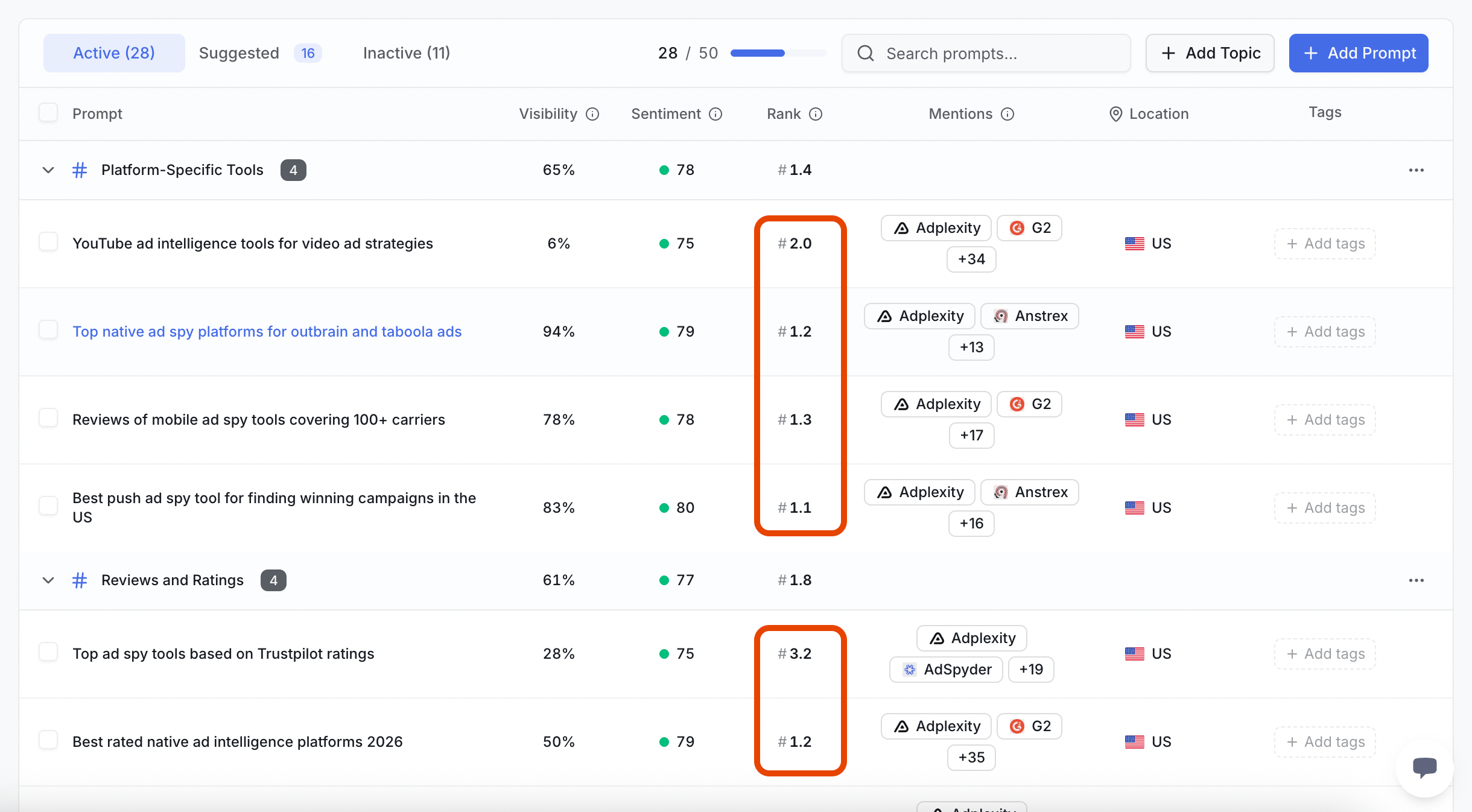
Your Rank for a specific prompt. For example:
"What are the top native ad spy platforms for Outbrain and Taboola ads?"
This is the most granular view and shows exactly how AI platforms rank brands for an individual question.
You can view the prompt Rank by expanding the topics in the **Prompts** page.
### Prompt Rank
Your Rank for a specific prompt. For example:
"What are the top native ad spy platforms for Outbrain and Taboola ads?"
This is the most granular view and shows exactly how AI platforms rank brands for an individual question.
You can view the prompt Rank by expanding the topics in the **Prompts** page.
 Together, these views help you understand both your overall visibility and your performance on the topics and questions that matter most to your business.
## What "average Rank" means
One answer is just one moment. ZeroRank runs your [prompts](/start/glossary) (the questions we ask AI engines for you) every day, across many AI engines. That is a lot of answers.
So instead of one Rank, you get an **average Rank** score — your typical spot across all of those answers.
* Average Rank **2** means you are usually named near the top.
* Average Rank **8** means you usually show up much later, after other brands.
Remember the rule: a lower number is better.
ZeroRank also tracks how many times each brand was mentioned, and how its visibility and rank have moved over time. You will see these change numbers on the [overview dashboard](/results/overview-dashboard) and the Reports page.
## Comparing against competitors
To get to the full **Brand Rankings** page, go to: **Overview > Brands card > Show all**.
Together, these views help you understand both your overall visibility and your performance on the topics and questions that matter most to your business.
## What "average Rank" means
One answer is just one moment. ZeroRank runs your [prompts](/start/glossary) (the questions we ask AI engines for you) every day, across many AI engines. That is a lot of answers.
So instead of one Rank, you get an **average Rank** score — your typical spot across all of those answers.
* Average Rank **2** means you are usually named near the top.
* Average Rank **8** means you usually show up much later, after other brands.
Remember the rule: a lower number is better.
ZeroRank also tracks how many times each brand was mentioned, and how its visibility and rank have moved over time. You will see these change numbers on the [overview dashboard](/results/overview-dashboard) and the Reports page.
## Comparing against competitors
To get to the full **Brand Rankings** page, go to: **Overview > Brands card > Show all**.
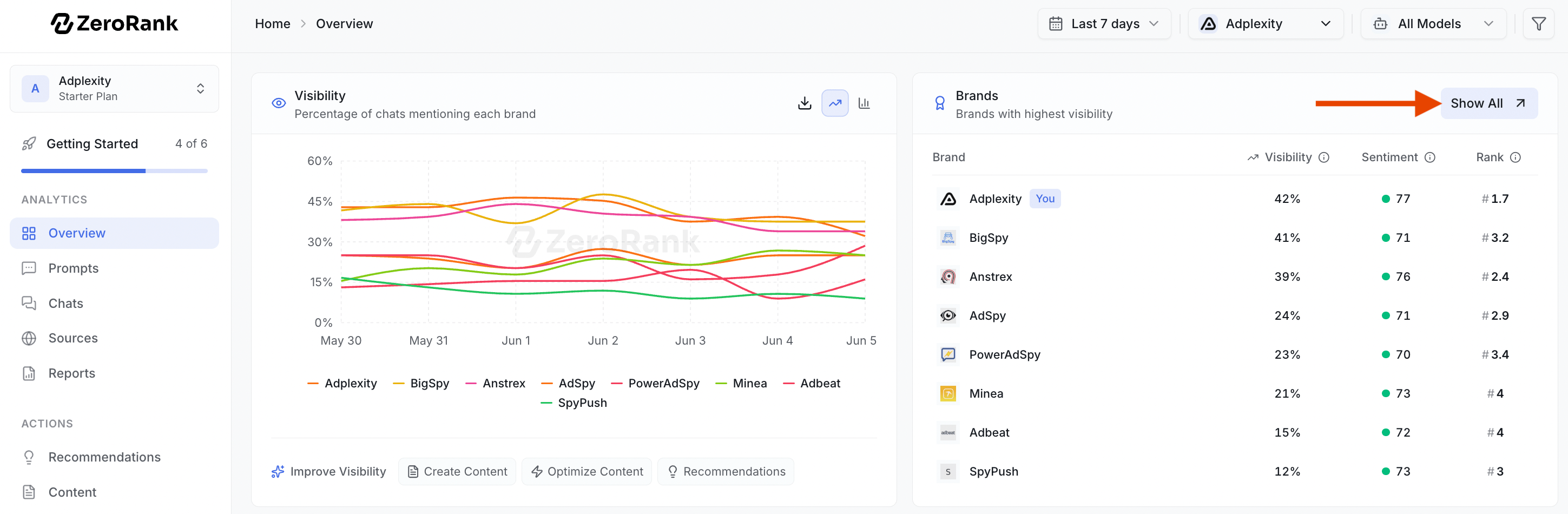 Because every brand sits in the same table, you can line them up side by side. One glance tells you who AI names most, who it ranks highest, and where you fit in.
You can change the view to focus on what you care about:
* **Sort** the table by a column. Click a column header to put the best (or worst) brands at the top. Sort by **Avg. Rank** to see who lands first in AI answers.
* **Search** for a brand by name to jump straight to it.
* **Export** the table to a `.csv` file to keep a copy or share it.
Because every brand sits in the same table, you can line them up side by side. One glance tells you who AI names most, who it ranks highest, and where you fit in.
You can change the view to focus on what you care about:
* **Sort** the table by a column. Click a column header to put the best (or worst) brands at the top. Sort by **Avg. Rank** to see who lands first in AI answers.
* **Search** for a brand by name to jump straight to it.
* **Export** the table to a `.csv` file to keep a copy or share it.
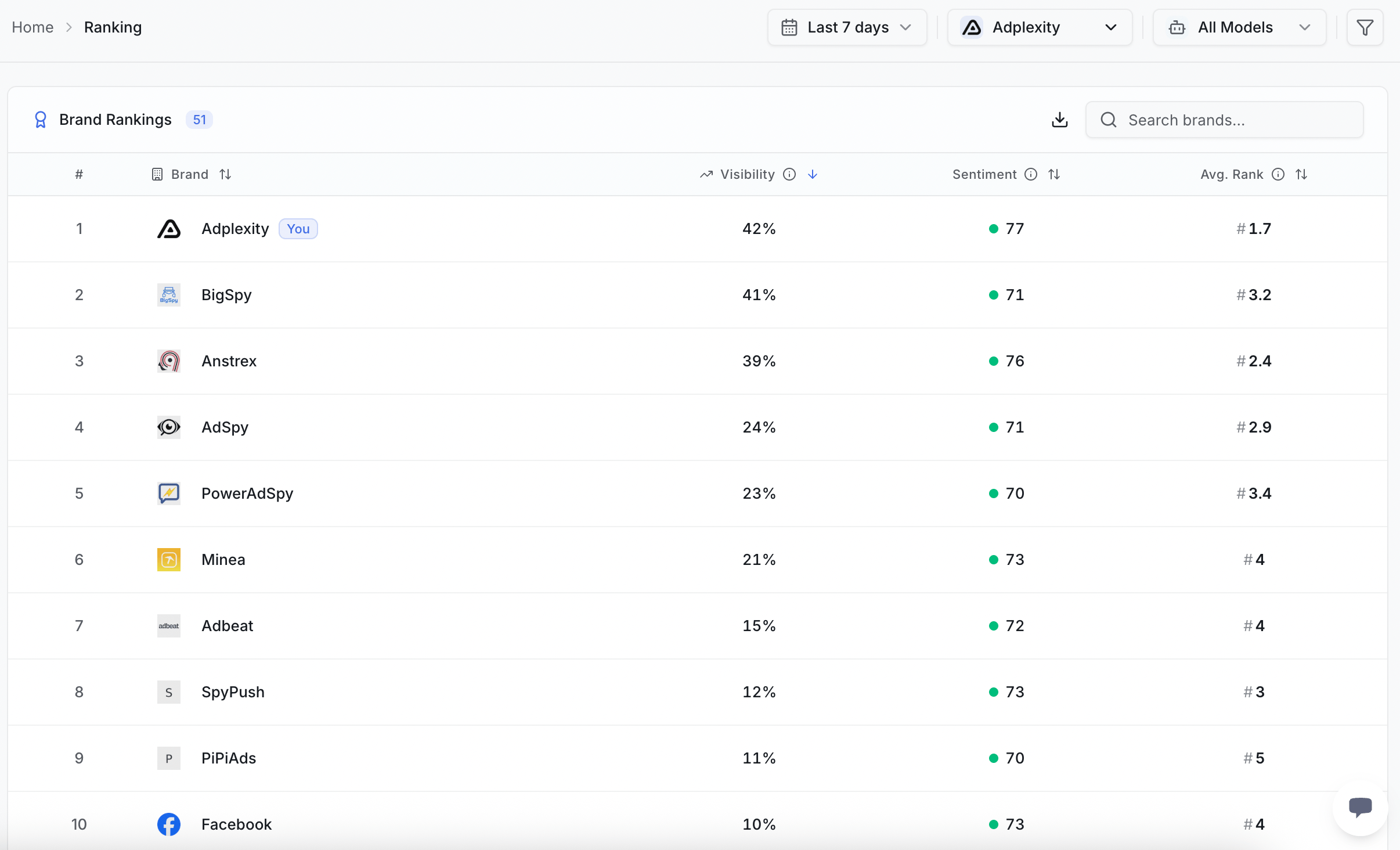 If a competitor's average Rank is below yours, they are getting named first more often. That is a sign to look at what they are doing — and to work on your own content.
## Watching Rank changes over time
Rank is most useful when you track how it changes over time.
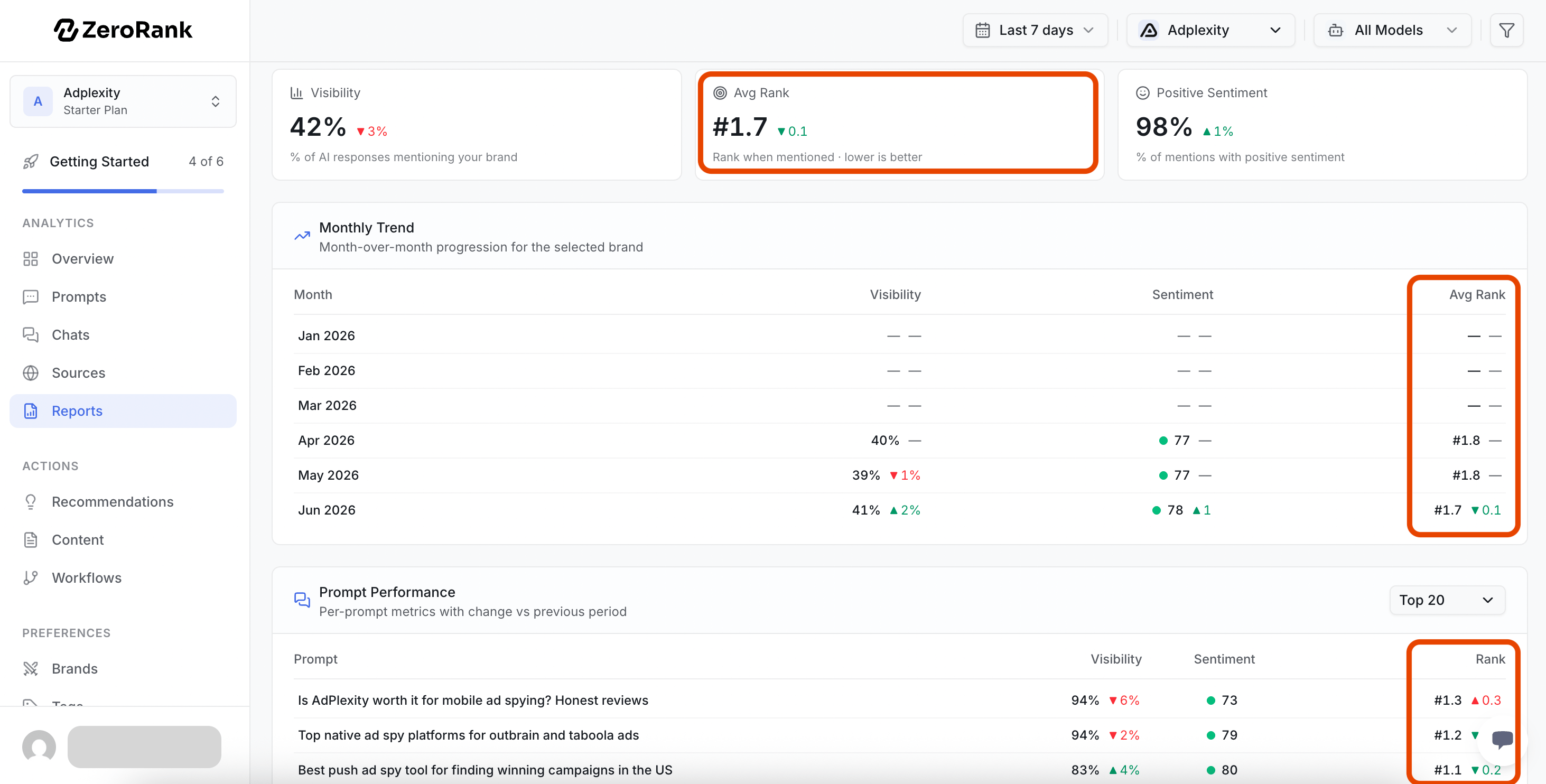
On the **Report** page, you can see your overall average Rank, as well as your rank for individual prompts.
Next to each Rank score, you'll see a delta indicator that compares your current performance to the previous period:
* 🟢 Green: your Rank improved.
* 🔴 Red: your Rank declined.
* ⚪ No color: your Rank stayed the same.
If a competitor's average Rank is below yours, they are getting named first more often. That is a sign to look at what they are doing — and to work on your own content.
## Watching Rank changes over time
Rank is most useful when you track how it changes over time.
On the **Report** page, you can see your overall average Rank, as well as your rank for individual prompts.
Next to each Rank score, you'll see a delta indicator that compares your current performance to the previous period:
* 🟢 Green: your Rank improved.
* 🔴 Red: your Rank declined.
* ⚪ No color: your Rank stayed the same.
 Remember: lower Rank numbers are better.
For example, moving from an average Rank of 5 to 3 is an improvement because your brand is being mentioned earlier in AI-generated answers. Moving from 3 to 5 means competitors are appearing ahead of you more often.
The goal is simple: over time, you want your average Rank to move closer to #1.
## Keep going
See the share of AI answers that mention your brand.
Choose which competitors show up in your rankings.
Remember: lower Rank numbers are better.
For example, moving from an average Rank of 5 to 3 is an improvement because your brand is being mentioned earlier in AI-generated answers. Moving from 3 to 5 means competitors are appearing ahead of you more often.
The goal is simple: over time, you want your average Rank to move closer to #1.
## Keep going
See the share of AI answers that mention your brand.
Choose which competitors show up in your rankings.