> ## Documentation Index
> Fetch the complete documentation index at: https://docs.zerorank.ai/llms.txt
> Use this file to discover all available pages before exploring further.
# Recent chats
> Read the actual answers AI engines gave to your tracked questions.
Scores and charts tell you *how often* your brand shows up. Recent chats show you *what the AI actually said*. This page explains how to read those real answers.
## What is a chat?
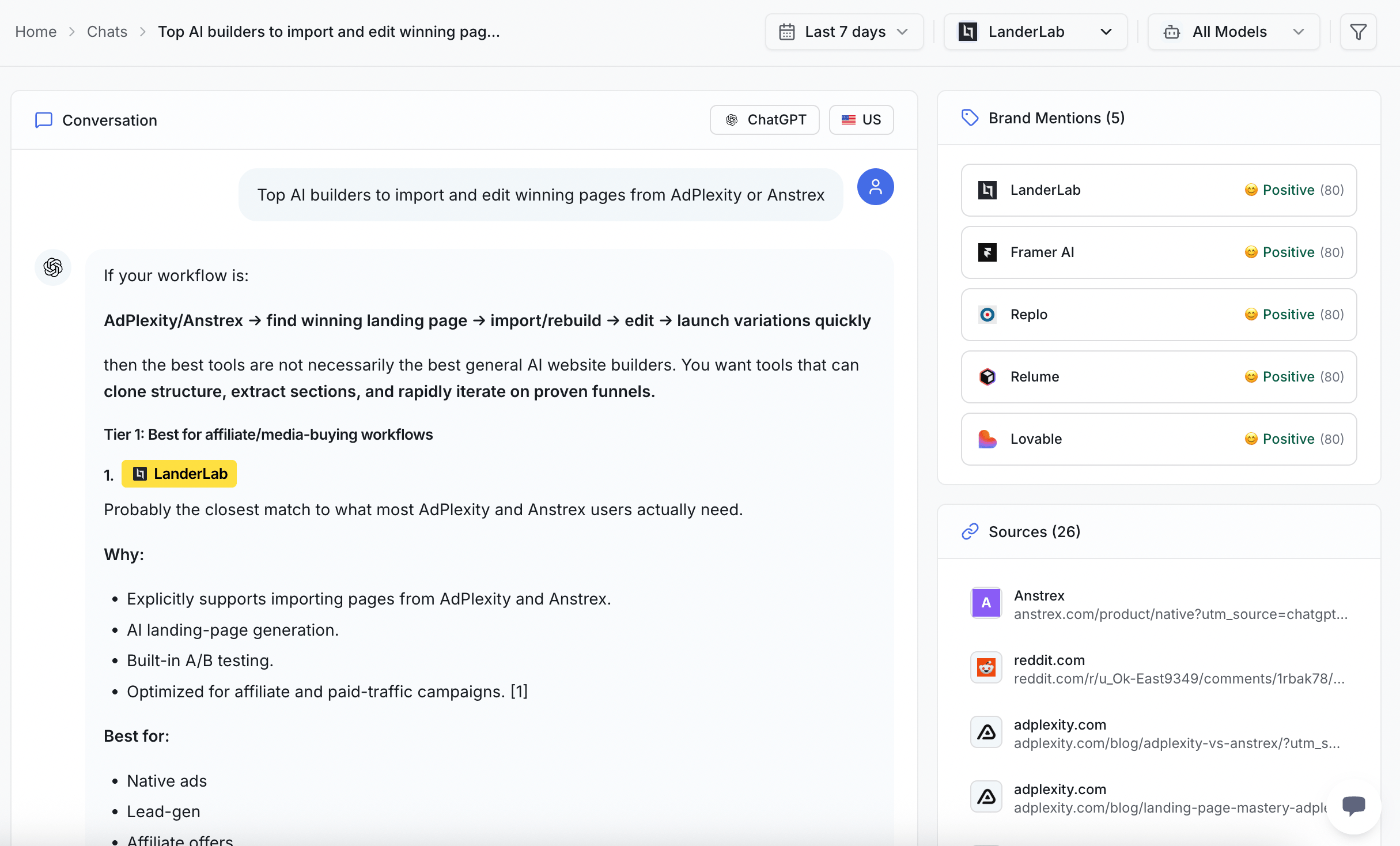
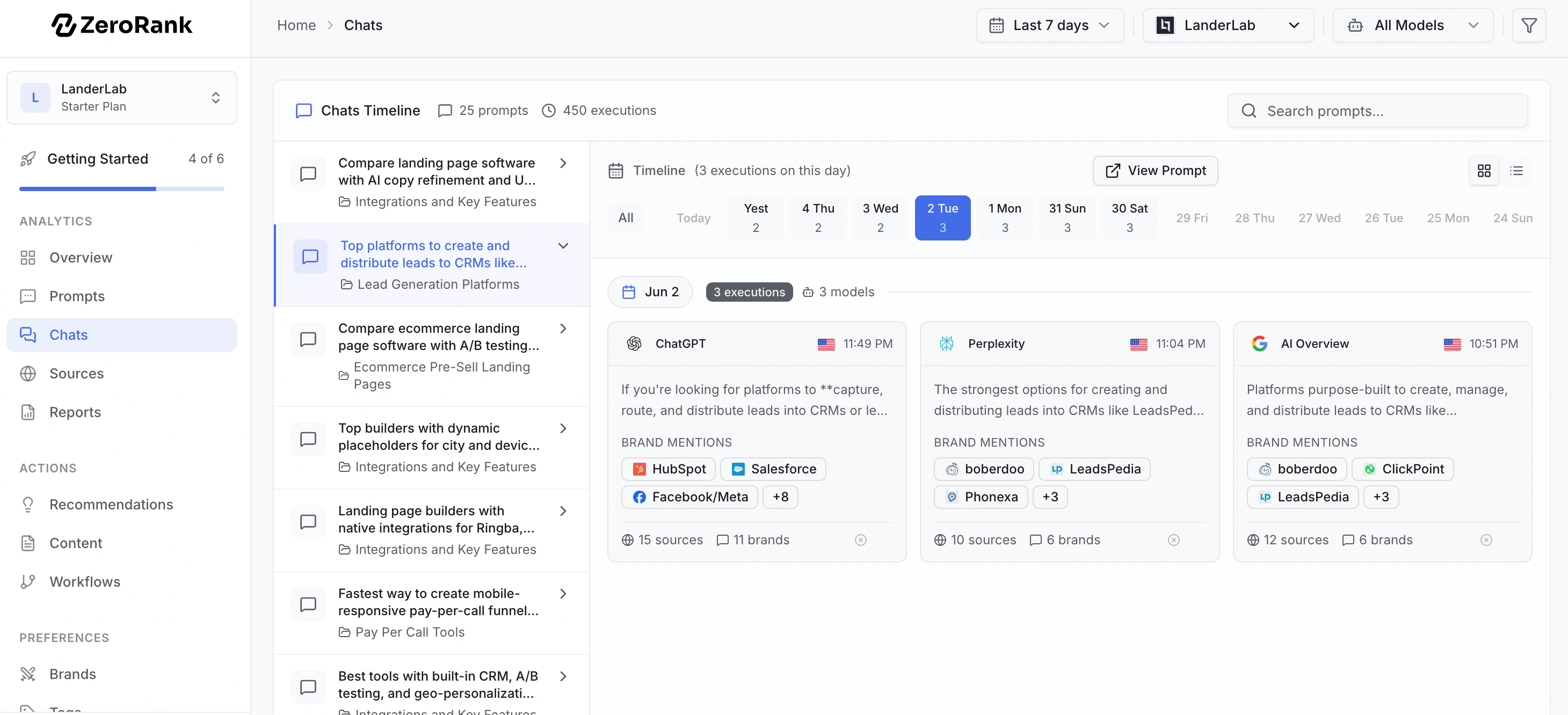
A [chat](/start/glossary) is the answer an AI engine gave back. Every day, ZeroRank asks your [prompts](/tracking/prompts) (the questions we ask AI engines for you) across 7 AI engines. Each answer it captures is one chat.
Every chat keeps a full record, so you can see exactly what happened:
* The **question** that was asked
* The **answer** the AI gave back, word for word
* The **AI model** that answered, like ChatGPT or Perplexity
* The **location** the question was asked from
* The **sources** — the websites the AI pointed to as its source
* The **brand mentions** ZeroRank found in that answer
* The brand **sentiment** — whether your brand was mentioned positively or not.
 ## Why reading real answers matters
A number can tell you that your brand showed up half the time. It cannot tell you *how* you showed up.
Reading the real answer shows you things a score hides:
* The exact words the AI used to describe you
* Which competitors stood next to you in the same answer
* Which websites the AI trusted enough to quote
* Whether your brand was mentioned positively or not.
This is the ground truth behind every chart. When a score moves, the chats explain why.
## Browse your recent chats
Your latest answers live under **Overview → Recent Chats**. This is a quick window into what AI engines said today.
Go to your [Overview dashboard](/results/overview-dashboard) and find the **Recent Chats** panel.
Click any chat to open the full answer, with the question and the AI model right at the top.
Want every answer for one question? Filter by the prompt to line them up side by side.
For the complete history, open the full **Chats** browser. It holds every answer ZeroRank has captured, not just the newest ones.
## Why reading real answers matters
A number can tell you that your brand showed up half the time. It cannot tell you *how* you showed up.
Reading the real answer shows you things a score hides:
* The exact words the AI used to describe you
* Which competitors stood next to you in the same answer
* Which websites the AI trusted enough to quote
* Whether your brand was mentioned positively or not.
This is the ground truth behind every chart. When a score moves, the chats explain why.
## Browse your recent chats
Your latest answers live under **Overview → Recent Chats**. This is a quick window into what AI engines said today.
Go to your [Overview dashboard](/results/overview-dashboard) and find the **Recent Chats** panel.
Click any chat to open the full answer, with the question and the AI model right at the top.
Want every answer for one question? Filter by the prompt to line them up side by side.
For the complete history, open the full **Chats** browser. It holds every answer ZeroRank has captured, not just the newest ones.
 ## What to look for in an answer
When you open a chat, read it the way a customer would. Ask yourself three quick questions:
* **Is your brand there?** Find your name in the answer. If it is missing, that is a gap to fix.
* **Which competitors are there?** See who showed up instead of you, or right beside you.
* **Which sources did the AI cite?** Note the websites the AI pointed to. Those are the pages winning the answer.
How many answers you get each month depends on your plan: 4,500 on Starter, 13,500 on Pro, and 31,500 or more on Enterprise. See [billing](/account/billing) for the full breakdown.
## From a chat to action
A chat is most useful when it leads to a change. Here is how to turn what you read into a next step:
* **Your brand is missing?** Head to [gaps](/improve/gaps) to find the questions where you do not show up yet.
* **A rival's website got cited and yours did not?** Open [sources](/citations/sources) to see which sites AI engines trust, then build content that earns the same spot.
Think of sources as the books AI quotes from. If your page is not on the shelf, the AI cannot read from it.
## Keep going
See the questions where your brand is missing, then fix them.
Learn which websites AI engines quote, and how to join them.
## What to look for in an answer
When you open a chat, read it the way a customer would. Ask yourself three quick questions:
* **Is your brand there?** Find your name in the answer. If it is missing, that is a gap to fix.
* **Which competitors are there?** See who showed up instead of you, or right beside you.
* **Which sources did the AI cite?** Note the websites the AI pointed to. Those are the pages winning the answer.
How many answers you get each month depends on your plan: 4,500 on Starter, 13,500 on Pro, and 31,500 or more on Enterprise. See [billing](/account/billing) for the full breakdown.
## From a chat to action
A chat is most useful when it leads to a change. Here is how to turn what you read into a next step:
* **Your brand is missing?** Head to [gaps](/improve/gaps) to find the questions where you do not show up yet.
* **A rival's website got cited and yours did not?** Open [sources](/citations/sources) to see which sites AI engines trust, then build content that earns the same spot.
Think of sources as the books AI quotes from. If your page is not on the shelf, the AI cannot read from it.
## Keep going
See the questions where your brand is missing, then fix them.
Learn which websites AI engines quote, and how to join them.