> ## Documentation Index
> Fetch the complete documentation index at: https://docs.zerorank.ai/llms.txt
> Use this file to discover all available pages before exploring further.
# Your visibility score
> How often AI mentions your brand, shown as a simple percentage.
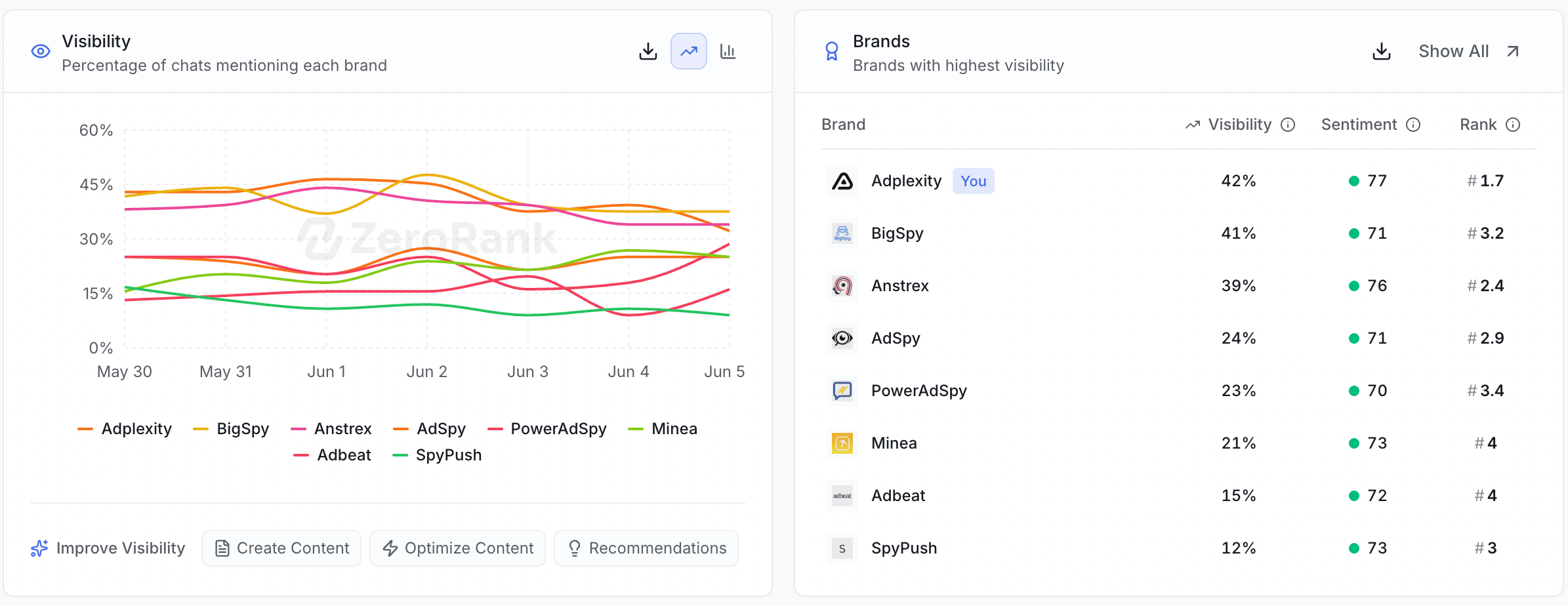
Your visibility score is **the share of AI answers that mention your brand**. It is one number, shown as a percentage. In the app you will see it labeled **% of AI responses mentioning your brand**.
Every day, ZeroRank runs your [prompts](/tracking/prompts) (a [question we ask AI engines for you](/start/glossary)) and reads each answer. Then it counts how many of those answers said your brand name. That count, turned into a percentage, is your visibility score.
 ## A quick example
Say ZeroRank collected 100 answers about your topic in a specific period of time. Your brand was named in 45 of them.
* 45 answers out of 100 = **45%**.
* So your visibility score is 45%.
The math is always the same: brand mentions, divided by total answers, shown as a percentage.
## How to read the change arrow
Next to your score, you will see a small badge with a change number. This is the **delta** — how your score moved compared to the period before.
* A green, plus number means more answers mentioned you than last time.
* A red, minus number means fewer answers mentioned you.
* A flat number means your score stayed about the same.
The delta compares this period to the one right before it. A single up or down day is normal. Watch the trend over a few weeks instead of one number.
## Compare against competitors
Each brand you track gets its own visibility score, including your competitors. That lets you see, side by side, who AI talks about most.
If a rival's score is higher than yours, AI is naming them more often than you. That gap is exactly what the rest of ZeroRank helps you close. See [brands and competitors](/tracking/brands-and-competitors) to set up the brands you compare.
## What counts as a good score?
There is no magic target. A "good" score depends on your industry, how many rivals you have, and how broad your prompts are.
The score that matters most is **higher than last month** and **higher than your competitors**. Aim to climb your own trend line, not to hit a fixed number.
## How to raise your visibility score
A low score means AI does not have enough clear, quotable info about you.
Here's a quick overview of how you can improve your score. For the full guide, check out the [Improve your visibility](/improve) section.
Open [gaps](/improve/gaps) to see which questions mention rivals but skip you. Those are your fastest wins.
Check [recommendations](/improve/recommendations) for the exact steps ZeroRank suggests for your brand.
Use [create content](/improve/create-content) to publish clear pages that answer those missing questions.
As more answers start naming your brand, your visibility score climbs and the change arrow turns green.
## Keep going
See the questions where AI names rivals but not you.
Follow the steps ZeroRank suggests to show up more.
## A quick example
Say ZeroRank collected 100 answers about your topic in a specific period of time. Your brand was named in 45 of them.
* 45 answers out of 100 = **45%**.
* So your visibility score is 45%.
The math is always the same: brand mentions, divided by total answers, shown as a percentage.
## How to read the change arrow
Next to your score, you will see a small badge with a change number. This is the **delta** — how your score moved compared to the period before.
* A green, plus number means more answers mentioned you than last time.
* A red, minus number means fewer answers mentioned you.
* A flat number means your score stayed about the same.
The delta compares this period to the one right before it. A single up or down day is normal. Watch the trend over a few weeks instead of one number.
## Compare against competitors
Each brand you track gets its own visibility score, including your competitors. That lets you see, side by side, who AI talks about most.
If a rival's score is higher than yours, AI is naming them more often than you. That gap is exactly what the rest of ZeroRank helps you close. See [brands and competitors](/tracking/brands-and-competitors) to set up the brands you compare.
## What counts as a good score?
There is no magic target. A "good" score depends on your industry, how many rivals you have, and how broad your prompts are.
The score that matters most is **higher than last month** and **higher than your competitors**. Aim to climb your own trend line, not to hit a fixed number.
## How to raise your visibility score
A low score means AI does not have enough clear, quotable info about you.
Here's a quick overview of how you can improve your score. For the full guide, check out the [Improve your visibility](/improve) section.
Open [gaps](/improve/gaps) to see which questions mention rivals but skip you. Those are your fastest wins.
Check [recommendations](/improve/recommendations) for the exact steps ZeroRank suggests for your brand.
Use [create content](/improve/create-content) to publish clear pages that answer those missing questions.
As more answers start naming your brand, your visibility score climbs and the change arrow turns green.
## Keep going
See the questions where AI names rivals but not you.
Follow the steps ZeroRank suggests to show up more.