> ## Documentation Index
> Fetch the complete documentation index at: https://docs.zerorank.ai/llms.txt
> Use this file to discover all available pages before exploring further.
# Brands and competitors
> Track your own brand and the rivals you want to beat.
A brand is a name ZeroRank looks for inside AI answers. You track your own brand and the rivals you care about. Then every answer is checked for those names, so you can see who shows up and who does not.
## Your brand
Your own brand is the first one you set up. ZeroRank uses it to spot you inside each [chat](/start/glossary) (the answer an AI engine gave back).
You can track more than one spelling. People and AI engines write brand names in different ways. So a brand holds:
* **Tracked names** — every spelling AI might use for you (like "ZeroRank" and "Zero Rank")
* **Domains** — one or more websites you own
* **Logo** — a small picture shown next to your name in charts
* **Industry** — what your business does
You can edit your own brand int the **Brands** page > Your brand.
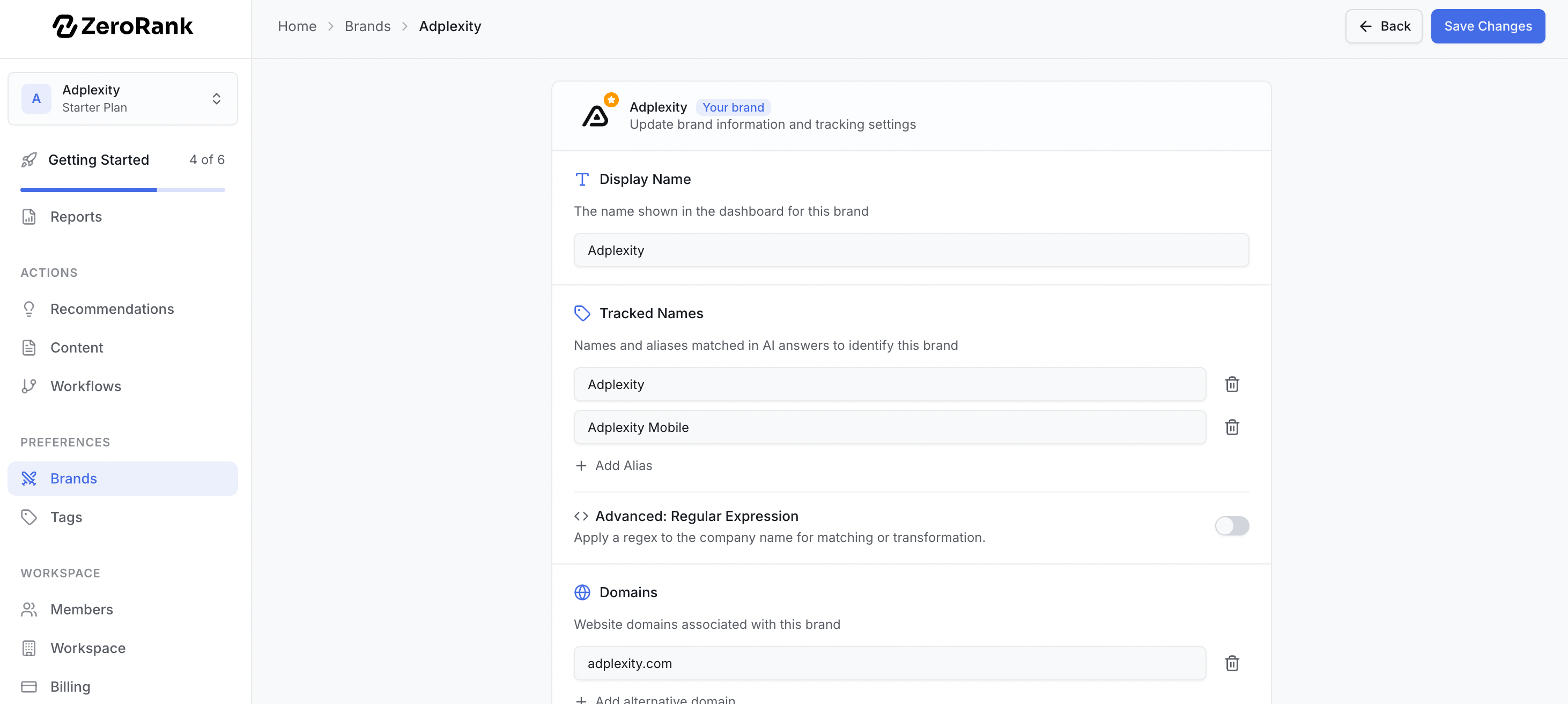 When any tracked name or domain shows up in an answer, that counts as a mention for your brand.
Advanced matching is available for tricky cases, like a name with many variations. Reach out to [support@zerorank.ai](mailto:support@zerorank.ai) if you need it.
## Competitors
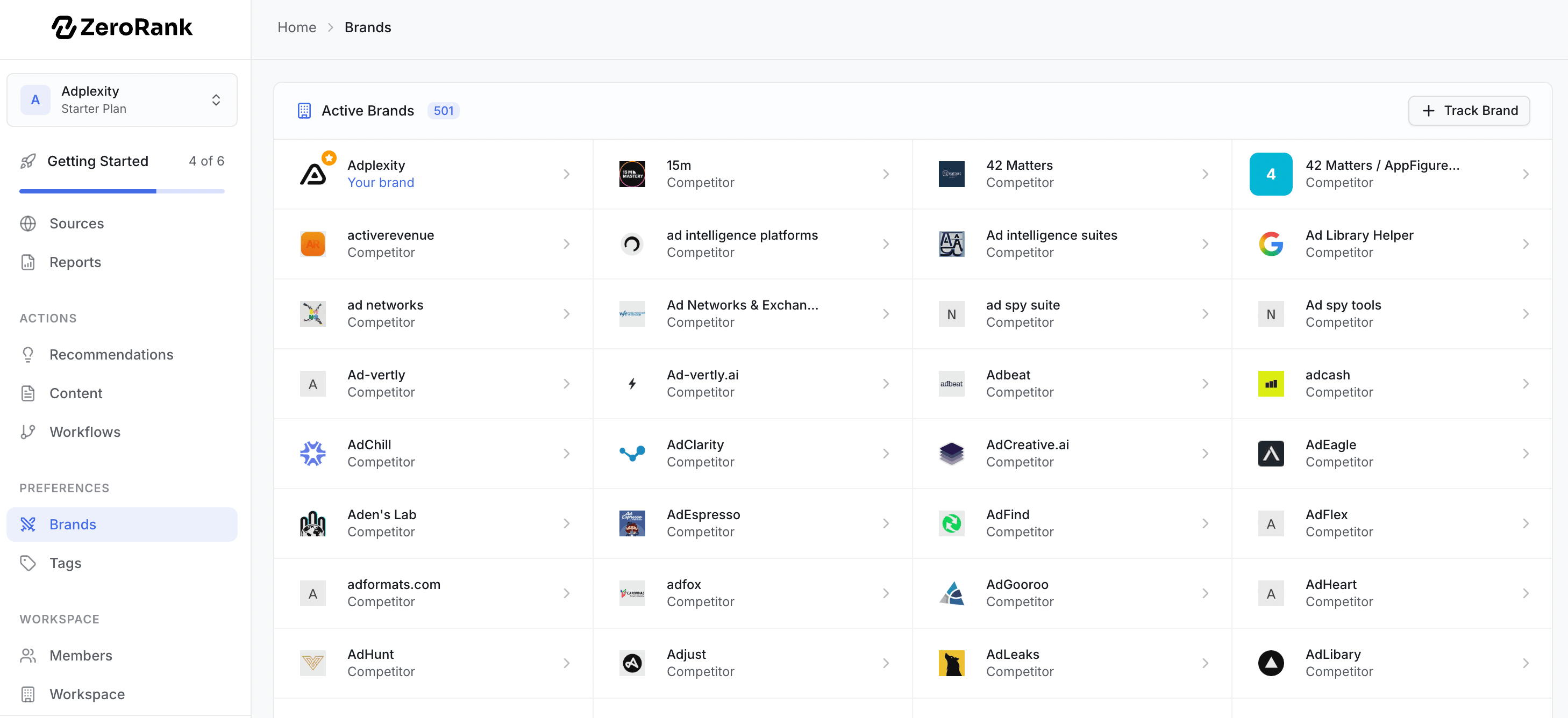
A competitor is a rival you want to beat. ZeroRank will automatically pick the list of competitors based on the information we have about your and your industry.
You can also add the ones you care about, and ZeroRank tracks them the same way it tracks you.
Each competitor has its own tracked names, domains, logo, and industry. Set them up just like your own brand. Then every answer is checked for them too.
When any tracked name or domain shows up in an answer, that counts as a mention for your brand.
Advanced matching is available for tricky cases, like a name with many variations. Reach out to [support@zerorank.ai](mailto:support@zerorank.ai) if you need it.
## Competitors
A competitor is a rival you want to beat. ZeroRank will automatically pick the list of competitors based on the information we have about your and your industry.
You can also add the ones you care about, and ZeroRank tracks them the same way it tracks you.
Each competitor has its own tracked names, domains, logo, and industry. Set them up just like your own brand. Then every answer is checked for them too.
 ## Why competitors matter
AI visibility is relative. You are not competing against a score. You are competing against the other brands AI platforms choose to mention.
Tracking competitors helps you understand who is winning the conversations that matter to your business and where the gaps are between their visibility and yours.
For example, you may discover that a competitor is mentioned more often, appears earlier in answers, or is consistently cited by sources that AI platforms trust. Those insights help explain why they are being recommended ahead of you.
By comparing your performance to competitors, you can identify opportunities to improve your visibility and focus your efforts where they are most likely to make an impact.
## Editing a brand
You can change any brand at any time. Open the brand in the **Brands** page and edit these:
Add or remove tracked names. More spellings means fewer missed mentions.
Add the websites tied to this brand.
Upload a picture so the brand is easy to spot in charts.
Set what the brand does. This keeps your list tidy.
## Show or hide brands
Inside the **Brands** page, every brand can be set to **visible** or **hidden**.
* **Visible** brands show up in your charts and tables.
* **Hidden** brands stay saved but drop out of the views.
Hiding is handy when a chart gets crowded. You keep the brand and its history, but clear the clutter. Turn it back on whenever you want.
## How brands flow into your results
Once a brand is tracked, it feeds straight into your results.
* On **Brand [Ranking](/results/ranking)s**, every brand gets a spot in the leaderboard. You see who shows up most across the AI engines.
* On the [visibility charts](/results/visibility-score), your [visibility score](/start/glossary) (the share of AI answers that mention your brand) sits right beside each rival's score.
So the brands you set here decide who appears in your charts. Add the right competitors now, and the rest of ZeroRank fills in around them.
## Keep going
See the leaderboard of you and your rivals.
Track the share of answers that mention you.
## Why competitors matter
AI visibility is relative. You are not competing against a score. You are competing against the other brands AI platforms choose to mention.
Tracking competitors helps you understand who is winning the conversations that matter to your business and where the gaps are between their visibility and yours.
For example, you may discover that a competitor is mentioned more often, appears earlier in answers, or is consistently cited by sources that AI platforms trust. Those insights help explain why they are being recommended ahead of you.
By comparing your performance to competitors, you can identify opportunities to improve your visibility and focus your efforts where they are most likely to make an impact.
## Editing a brand
You can change any brand at any time. Open the brand in the **Brands** page and edit these:
Add or remove tracked names. More spellings means fewer missed mentions.
Add the websites tied to this brand.
Upload a picture so the brand is easy to spot in charts.
Set what the brand does. This keeps your list tidy.
## Show or hide brands
Inside the **Brands** page, every brand can be set to **visible** or **hidden**.
* **Visible** brands show up in your charts and tables.
* **Hidden** brands stay saved but drop out of the views.
Hiding is handy when a chart gets crowded. You keep the brand and its history, but clear the clutter. Turn it back on whenever you want.
## How brands flow into your results
Once a brand is tracked, it feeds straight into your results.
* On **Brand [Ranking](/results/ranking)s**, every brand gets a spot in the leaderboard. You see who shows up most across the AI engines.
* On the [visibility charts](/results/visibility-score), your [visibility score](/start/glossary) (the share of AI answers that mention your brand) sits right beside each rival's score.
So the brands you set here decide who appears in your charts. Add the right competitors now, and the rest of ZeroRank fills in around them.
## Keep going
See the leaderboard of you and your rivals.
Track the share of answers that mention you.