> ## Documentation Index
> Fetch the complete documentation index at: https://docs.zerorank.ai/llms.txt
> Use this file to discover all available pages before exploring further.
# Query fanout
> The smaller questions AI asks itself behind one of your prompts.
When you ask an AI engine one question, it often does not search for that exact question. Instead, it quietly breaks your question into smaller ones and searches those first. **Query fanout** is the [smaller questions AI asks itself behind one question](/start/glossary).
Say your [prompt](/tracking/prompts) is "best running shoes for flat feet." Before it answers, the AI might quietly look up "what causes flat feet," "shoe support for flat feet," and "top running shoe brands 2026." Those quiet little questions are the fanout.
Think of it like a grocery list. You ask for "dinner," but the shopping list breaks into milk, bread, and eggs. The AI shops the small items, then hands you the finished meal.
## What ZeroRank shows you
For each [chat](/start/glossary) (the answer an AI engine gave back), ZeroRank captures the fanout queries the AI used along the way. Then it pulls those queries together so you can spot patterns.
You can see:
* The list of fanout queries behind a chat.
* The most common terms across those queries.
* Simple stats about how much fanout happened.
* Fanout grouped by the parent prompt it came from.
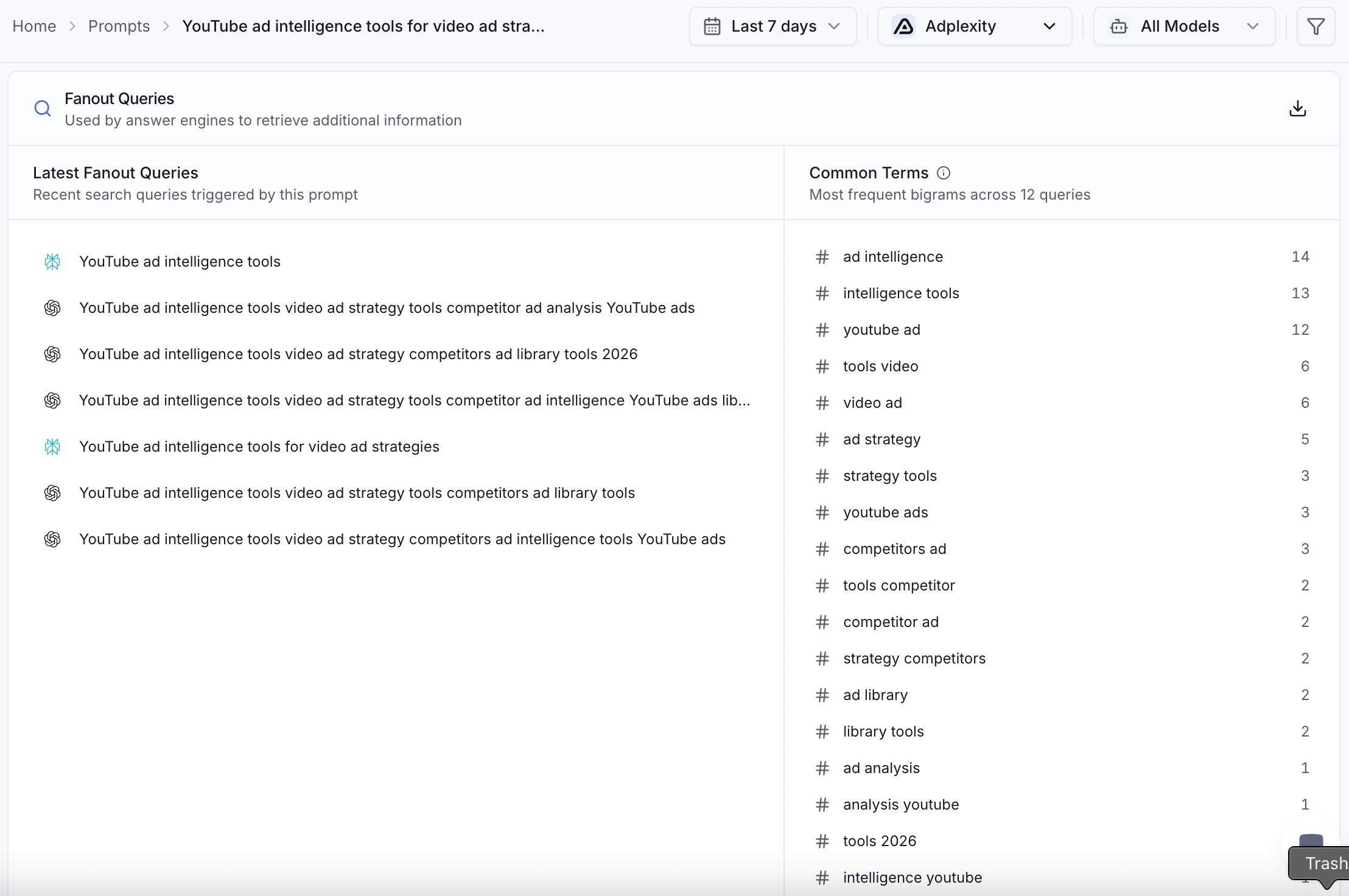 Grouping by parent prompt is the useful part. It shows you, for one of your prompts, every small question the AI tends to ask underneath it.
How many fanout queries an answer used is saved with each chat. So you can look back at past answers and see how the AI broke your question apart over time.
## Why query fanout matters
Each small question is another door into the answer. The more of those doors your content can walk through, the more chances your brand has to show up.
If your website only answers the big question, you have one way in. If it also answers the smaller questions, you have many. That is why fanout is worth watching.
## Turn fanout into new ideas
Fanout is a free list of what your buyers are really asking. Use it two ways.
Read the small questions under one of your prompts. If a question keeps showing up and you are not tracking it, add it as its own [prompt](/tracking/prompts).
Look at the common terms across the fanout. Those terms are gaps your content could fill. Write a page or [article](/improve/create-content) that answers them plainly.
When your content answers the small questions, the AI has more reasons to pull from you. Over time that can lift your [visibility score](/results/visibility-score).
## Estimate fanout in a workflow
ZeroRank also has a **Query Fanout Estimator** step you can drop into a [workflow](/workflows/overview). It guesses the small questions a prompt is likely to fan out into, so you can plan content before you even run the prompt.
## Keep going
Add the small questions you find as new prompts to track.
Turn fanout terms into pages that answer what buyers ask.
Grouping by parent prompt is the useful part. It shows you, for one of your prompts, every small question the AI tends to ask underneath it.
How many fanout queries an answer used is saved with each chat. So you can look back at past answers and see how the AI broke your question apart over time.
## Why query fanout matters
Each small question is another door into the answer. The more of those doors your content can walk through, the more chances your brand has to show up.
If your website only answers the big question, you have one way in. If it also answers the smaller questions, you have many. That is why fanout is worth watching.
## Turn fanout into new ideas
Fanout is a free list of what your buyers are really asking. Use it two ways.
Read the small questions under one of your prompts. If a question keeps showing up and you are not tracking it, add it as its own [prompt](/tracking/prompts).
Look at the common terms across the fanout. Those terms are gaps your content could fill. Write a page or [article](/improve/create-content) that answers them plainly.
When your content answers the small questions, the AI has more reasons to pull from you. Over time that can lift your [visibility score](/results/visibility-score).
## Estimate fanout in a workflow
ZeroRank also has a **Query Fanout Estimator** step you can drop into a [workflow](/workflows/overview). It guesses the small questions a prompt is likely to fan out into, so you can plan content before you even run the prompt.
## Keep going
Add the small questions you find as new prompts to track.
Turn fanout terms into pages that answer what buyers ask.