

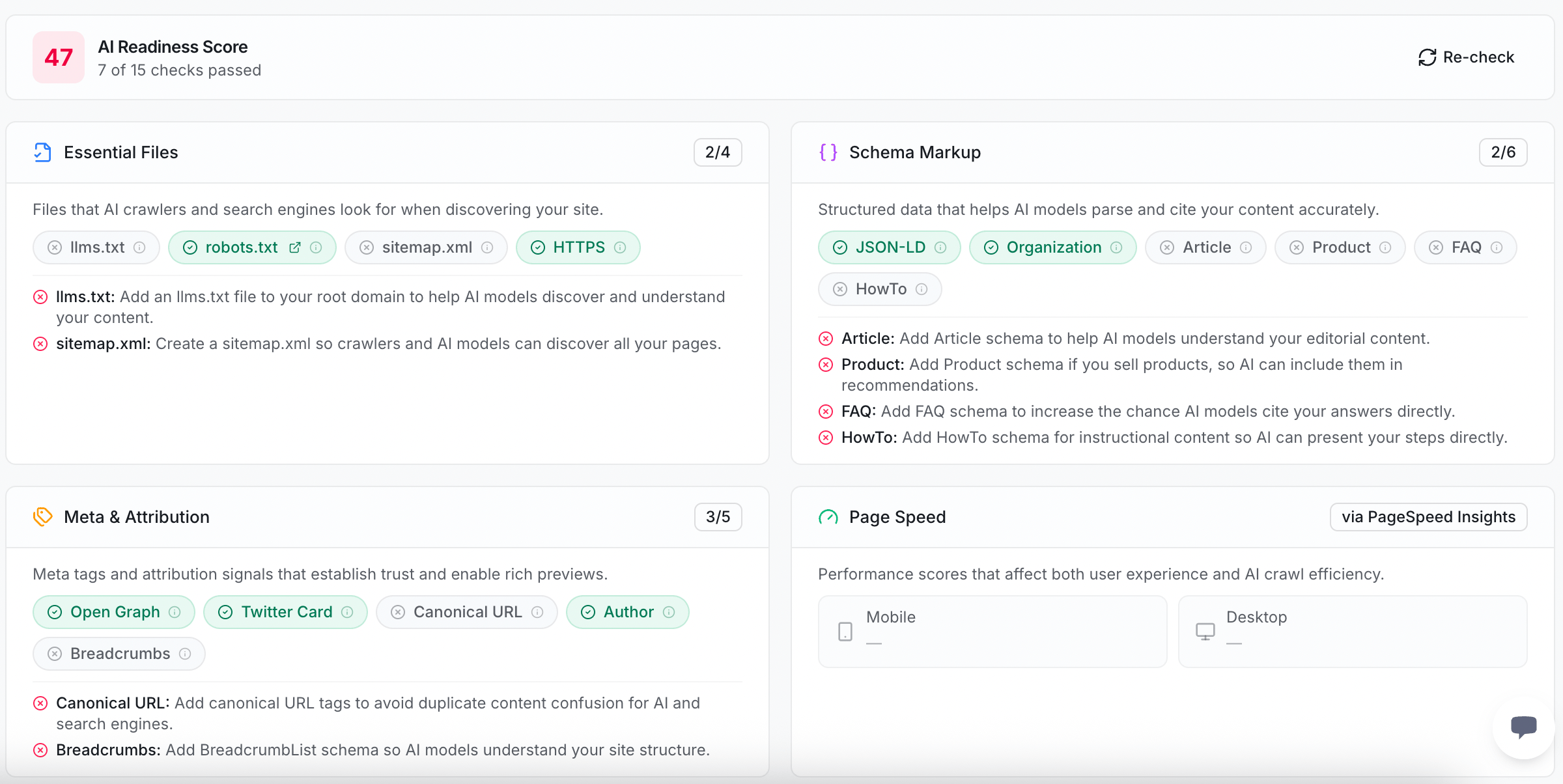
What we check
Essential files
Essential files
Small files at the root of your site that tell crawlers (the bots that read websites) what to do.
llms.txt— a file that introduces your site to AI models, so they understand what you offer.robots.txt— a file that tells crawlers which pages they may visit.sitemap.xml— a map of all your pages, so crawlers can find every one.- HTTPS — a secure connection, which AI engines trust more than a plain one.
Schema markup
Schema markup
Schema markup means small labels in your page code that tell machines what things are. Clear labels help AI quote you correctly.
- JSON-LD — the format these labels are written in.
- Organization — labels that say who your brand is.
- Article — labels that mark a piece of writing, like a blog post.
- Product — labels that describe something you sell.
- FAQ — labels that mark questions and answers.
- HowTo — labels that mark step-by-step instructions.
Meta and attribution
Meta and attribution
Extra tags that give AI a tidy preview of your page and show who made it.
- Open Graph — tags that build a rich preview when your page is shared.
- Twitter Card — tags that build a preview on X (Twitter).
- Canonical URL — a tag that points to the one true web address for a page, so AI does not see duplicates.
- Author — a label that names who wrote the content, which signals expertise.
- Breadcrumbs — labels that show where a page sits in your site, so AI understands your structure.
Page speed
Page speed
A score for how fast your pages load, on both phone and desktop. Fast pages get crawled and used more happily, so AI is more likely to reach all of your content.
You do not need every check to pass. Start with the ones marked as failed. Each one comes with a short note on what to add.
Where to find this in the app
You can run this checkup yourself.1
Open technical recommendations
In the app, go to the technical recommendations area.
2
Read your score
The top card shows your AI Readiness Score and how many checks passed.
3
Fix the failed checks
Each failed check comes with a short note on what to add. Hand it to whoever manages your site.
4
Re-check
After you make a change, click Re-check to run the checkup again.
Next steps
Recommendations
See the full list of fixes ZeroRank suggests for your site.
AEO score
Check how ready a single page is for AI answers.